
Spreadsheet lookup functions solve an exceptionally common operational challenge where a unique piece of information identifies a broader record, yet the specific data point required for decision-making is stored elsewhere in the workbook. A product SKU might identify a unit price, an employee identification number can determine a department assignment, or a postal zip code may correspond to a designated delivery region. Instead of forcing analysts to manually scan hundreds of rows, an automated lookup formula retrieves the associated value instantly, forming the connective tissue of modern business reporting.
The primary challenge facing spreadsheet users is that modern applications offer multiple divergent lookup methodologies, and these functions do not behave in uniform ways. Traditional functions like VLOOKUP and HLOOKUP remain functional staples in legacy environments, while modern alternatives such as XLOOKUP and complex formulas combining INDEX and MATCH provide entirely different tiers of flexibility and performance. Selecting the optimal method requires evaluating the underlying structure of the data, determining whether an exact match is mandatory, understanding the spatial location of the return column, and anticipating how frequently the worksheet architecture will change in the future.
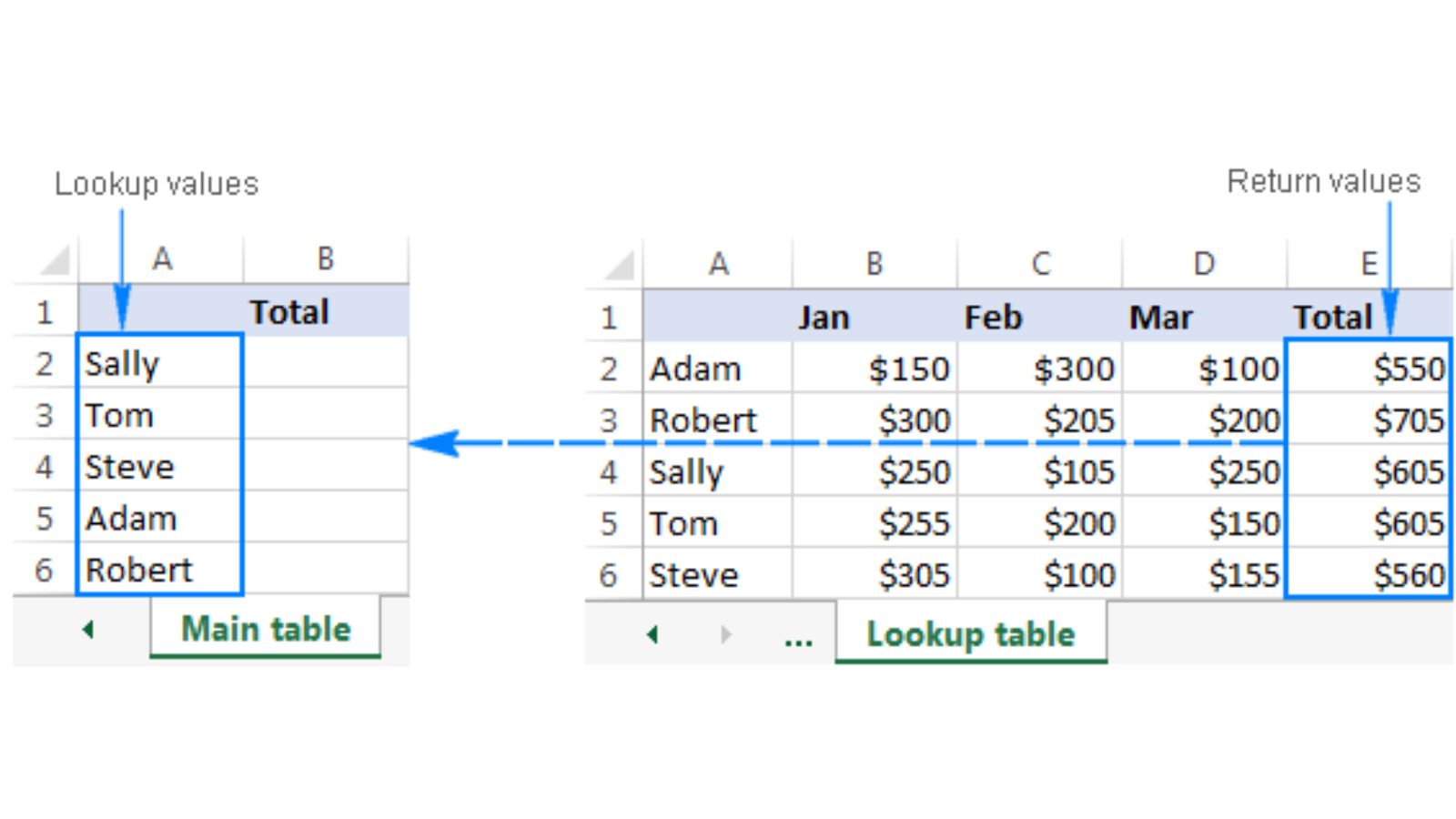
Before evaluating any specific formula syntax, an analyst must clearly identify three foundational variables: the exact value being searched for, the specific source range containing that target value, and the corresponding information that needs to be returned. Consider a scenario where a primary worksheet contains employee identification numbers in one column alongside corresponding departments, physical locations, and job titles distributed across adjacent columns. If a secondary financial model needs to pull the correct department using only the employee ID, the ID functions as the lookup value while the department serves as the designated return value.
Although this structural relationship sounds straightforward, recurring lookup errors almost always originate from data quality flaws rather than formula syntax mistakes. Invisible trailing spaces, inconsistent alphanumeric identifiers, duplicate keys, numeric values stored improperly as text strings, or mismatched regional date formats can easily prevent an otherwise flawless formula from locating the expected record. A professional lookup design therefore starts with establishing a stable, immutable identifier. Human names make notoriously poor lookup keys because multiple employees frequently share identical names or employ varying spelling conventions, making unique alphanumeric keys essential for reliable automation.
VLOOKUP remains one of the most widely recognized and frequently utilized functions in spreadsheet history, designed specifically to search for a target value within the leftmost column of a designated table array and return a corresponding value from another column located further to the right within that same horizontal row. For straightforward, well-structured vertical tables, VLOOKUP can be entirely adequate for daily reporting needs. For example, if proprietary product codes are neatly organized in column A while corresponding wholesale prices reside in column C, a standard formula can scan the code column and fetch the correct price efficiently.
However, this function carries a rigid structural limitation: VLOOKUP is hardcoded to search exclusively in the first column of the selected array and pull information from columns positioned strictly to its right. This restriction makes the function cumbersome or completely unusable when the desired return data happens to sit to the left of the lookup column. Furthermore, the final argument governing match behavior demands careful attention. When an exact match is required for categorical or identifier lookups, utilizing an exact match parameter ensures the engine rejects approximate guesses, whereas omitting the argument or invoking approximate matching triggers strict sequential sorting prerequisites that can easily corrupt financial outputs if the source table lacks proper ascending order.
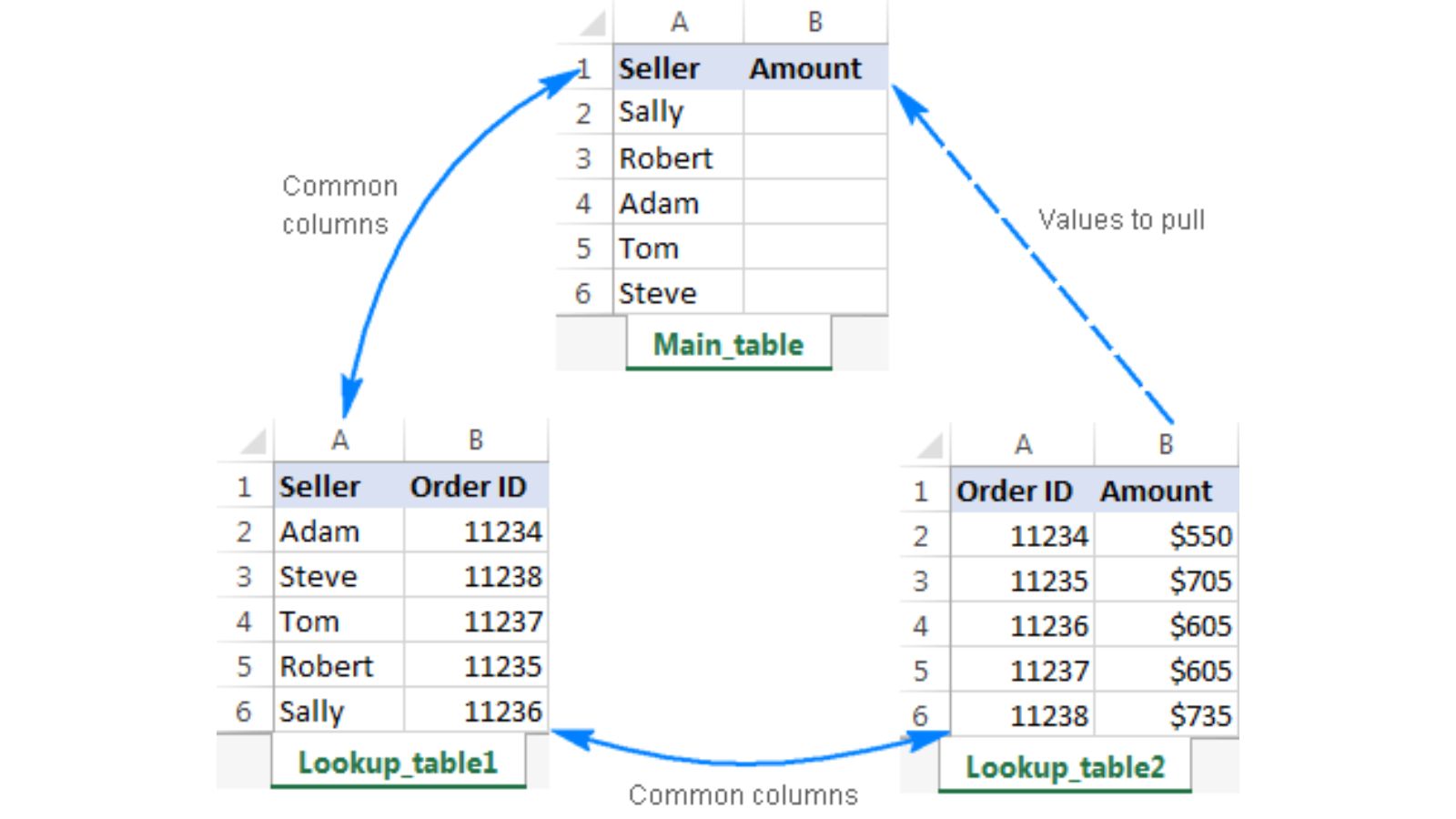
XLOOKUP was engineered specifically to dismantle the legacy limitations of older lookup functions by allowing users to search a designated lookup range or array and independently return the corresponding item from an entirely separate range or array. Unlike its predecessor VLOOKUP, XLOOKUP completely eliminates the requirement for the lookup column to reside as the absolute leftmost column of a table structure. Because the lookup array and return array are specified as independent parameters, the desired result can be positioned freely to the left, to the right, above, or below the primary search range, liberating spreadsheet designers from rigid table boundaries.
Furthermore, XLOOKUP defaults automatically to exact matching, which protects everyday users from accidentally triggering hazardous approximate search behaviors on un-sorted operational data. It also introduces robust, built-in arguments for handling missing lookup values gracefully and incorporating advanced search directional controls. For contemporary workbooks operating within modern spreadsheet software environments, XLOOKUP serves as a highly efficient default standard. Nevertheless, enterprise compatibility considerations remain paramount; if a mission-critical workbook must be opened and edited across legacy spreadsheet software that lacks native support for XLOOKUP, falling back to a universally supported structural approach becomes an operational necessity.
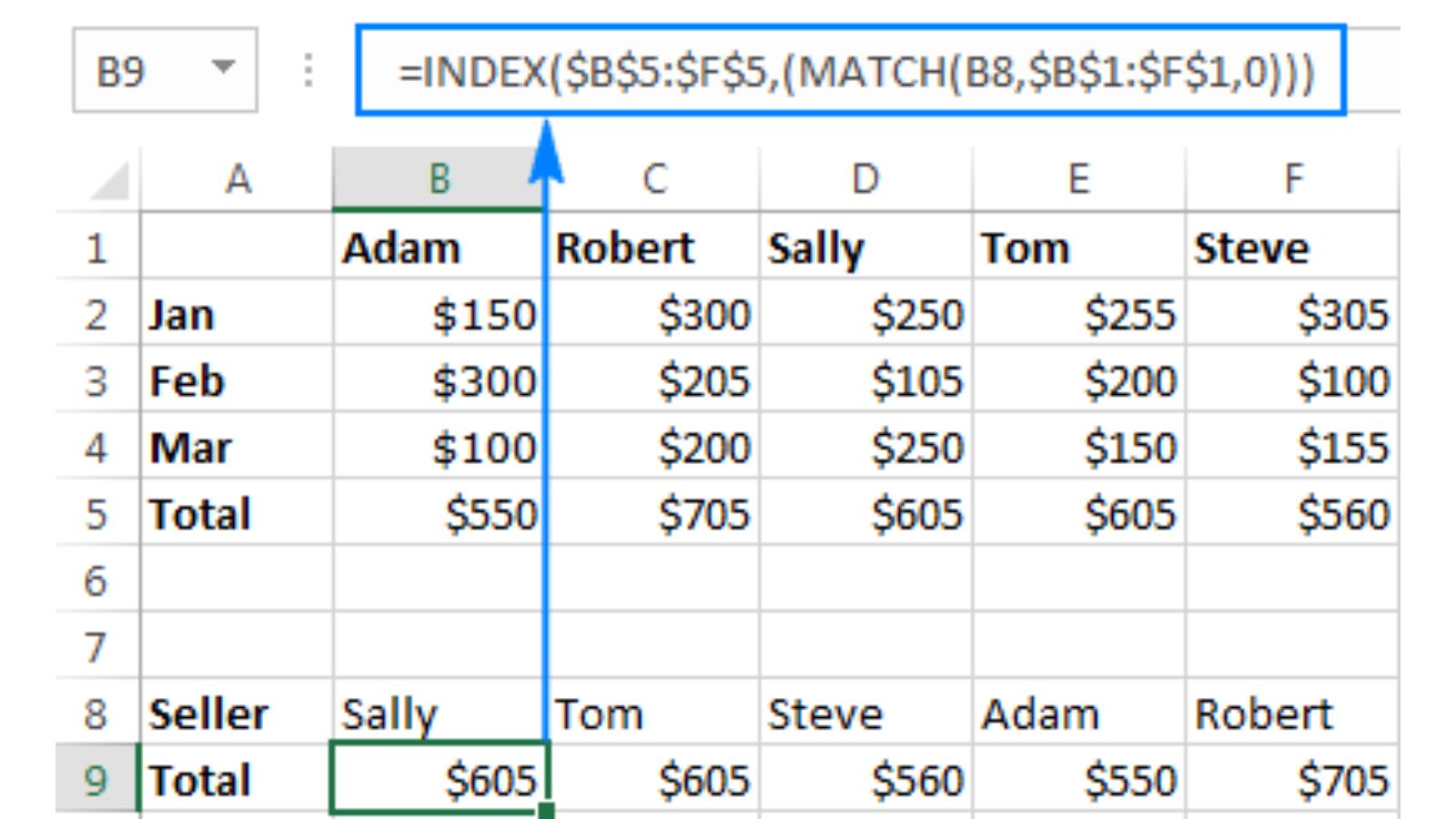
Long before the introduction of modern array functions, expert analysts routinely combined the INDEX and MATCH functions to construct highly adaptable, bidirectional lookup engines. The MATCH function scans a specified single-column or single-row range and returns the exact relative integer position of a target item, while the INDEX function extracts the specific value residing at a defined row and column intersection within an array. Combining these tools creates a powerful lookup mechanism where the search range and return range remain entirely independent of one another.
The primary advantage of this modular combination is absolute layout flexibility, as the return value is no longer restricted to sitting to the right of the search column. This makes INDEX and MATCH invaluable when maintaining legacy financial models, operating within software ecosystems that restrict modern functions, or engineering complex dashboard architectures where decoupled ranges are structurally mandatory. The primary trade-off involves readability and cognitive load; for junior team members or external auditors who are unfamiliar with nested formula structures, an intricate combination of these functions can be significantly harder to audit and maintain than a streamlined modern lookup expression.
While vertical data arrangements represent the overwhelming majority of spreadsheet designs, specialized datasets occasionally organize information horizontally across columns rather than vertically down rows. The HLOOKUP function mirrors the operational logic of VLOOKUP but operates across the top row of a data array to retrieve values from a specified row below. While this provides a direct solution for intentionally horizontal layouts, horizontal data structures notoriously degrade in maintainability as enterprise datasets expand over time. Most analytical models perform with significantly greater stability when each individual business record occupies a single row and each distinct variable is confined to a vertical column.
Beyond structural orientation, analysts must rigorously distinguish between exact match requirements and approximate threshold evaluations. An exact match lookup answers a precise question regarding which unique record possesses a specific identifier, such as an employee ID, an invoice number, or a bank account string. Conversely, an approximate lookup evaluates which numerical range or boundary threshold contains an intermediate value, such as progressive tax brackets, tiered commission schedules, or sliding grading scales. Treating these distinct analytical tasks interchangeably by forcing approximate matching onto unique identifier columns introduces catastrophic calculation errors into operational models.
A standard lookup formula executes its matching protocol mechanically, but the presence of duplicated lookup keys within a source dataset can introduce severe ambiguity into the final output. If an inventory table accidentally contains multiple rows sharing an identical product SKU but displaying conflicting wholesale prices, a single-result lookup function cannot autonomously determine which price reflects the correct operational record without additional helper columns or rigorous data normalization. This reality underscores the vital importance of incorporating data validation checks directly into workbook design to verify whether primary lookup keys maintain absolute uniqueness where expected.
When multiple operational records legitimately share a single key across time, a conventional single-result lookup tool is fundamentally inappropriate, and analysts should pivot toward filtering arrays, aggregation summaries, or multi-result indexing techniques. Ultimately, selecting the optimal lookup approach is never about blindly adopting the newest function or writing the shortest possible formula, but rather matching the tool precisely to the underlying data architecture, software environment, and maintenance constraints of the organization. A reliable lookup model is not simply one that successfully clears an error check and returns a text string, but one whose mathematical output faithfully mirrors the real-world business relationship the spreadsheet was engineered to represent.